At CVS Midwest Tape, we take pride in our time-saving, user-friendly website. Recently, we made some improvements to
www.cvsmidwesttapes.ca. Below is a list of those changes followed by a detailed description of each.
April Website Updates
- New Release Panel
- Calendar Function Enhancement
- Blu-ray and Playaway Format Separation
- Revised Help Tab
New Release Panel
We’ve redesigned the new release panel on our homepage, adding additional collections and giving it a cleaner, brighter look. You can now select which collections within each of our formats (including Blu-ray and Playaway) you would like to view.
Click image to enlarge.
Upon hovering over a title within the new release panel, a textbox displaying product details will appear. If you mouse away from that title, the textbox will disappear. This feature also exists on our Calendar tool.
Click image to enlarge.
Calendar Function Enhancement
We’ve added a new tab along our top header labeled
Calendar.
Click image to enlarge.
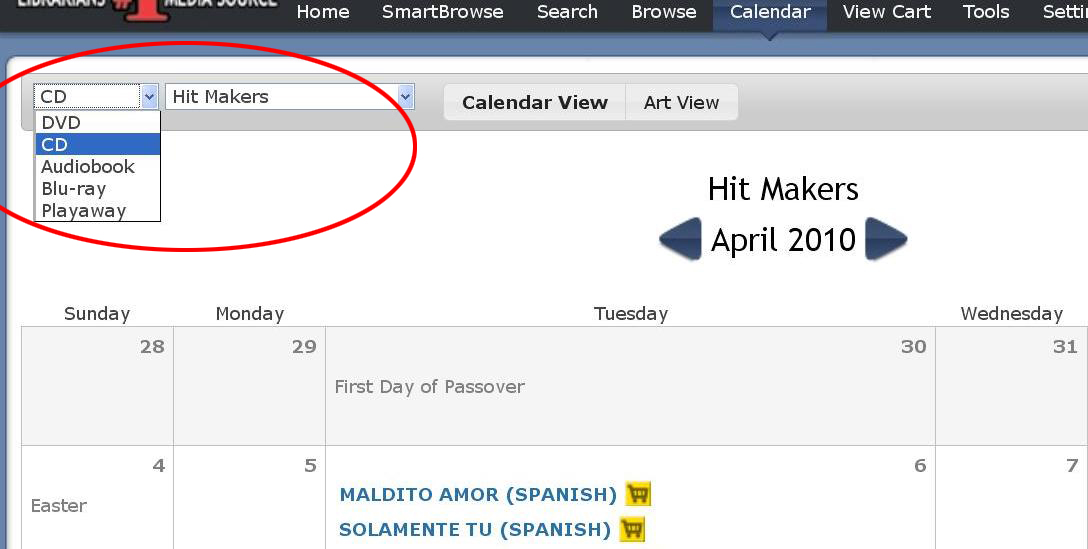
Upon clicking this new tab, you’ll be directed to our enhanced Calendar (also accessible via Quick Links). The new Calendar has dropdown menus that allow you to sort by media format and collection.
Click image to enlarge.
If you click the “Art View” option, the calendar will change from the list view display to an artwork display.
Click image to enlarge.
You will now be able to view the artwork for products in order of street date.
Click image to enlarge.
Blu-ray and Playaway Format Separation
Because our Playway and Blu-ray collections continue to grow, we have separated the two from the DVD and Audiobook formats. You will now be able to view Playaway and Blu-ray titles via the new release and Quick Links panels on the homepage:
Click image to enlarge.
Additionally, when you search for titles via SmartBrowse, Blu-ray and Playaway results will show up separate from DVDs and Audiobooks:
Click image to enlarge.
Revised Help Tab
In order to make it more usable, we have redesigned the Help tab on the webpage. We’ve now reorganized items and made all links readily accessible:
Click image to enlarge.
For questions regarding our latest website updates, please contact Customer Service at 1.866.698.2231. You can also post your questions and feedback here as comments.



 symbols.






 Contact Us
