
News Home RSS Feed

Tuesday, April 27, 2010

New Features for CVSMidwestTapes.ca

At CVS Midwest Tape, we take pride in our time-saving, user-friendly website. Recently, we made some improvements to www.cvsmidwesttapes.ca. Below is a list of those changes followed by a detailed description of each.

April Website Updates
  • New Release Panel
  • Calendar Function Enhancement
  • Blu-ray and Playaway Format Separation
  • Revised Help Tab

New Release Panel
We’ve redesigned the new release panel on our homepage, adding additional collections and giving it a cleaner, brighter look. You can now select which collections within each of our formats (including Blu-ray and Playaway) you would like to view.

Click image to enlarge.

Upon hovering over a title within the new release panel, a textbox displaying product details will appear.  If you mouse away from that title, the textbox will disappear. This feature also exists on our Calendar tool.

Click image to enlarge.

Calendar Function Enhancement
We’ve added a new tab along our top header labeled Calendar.

Click image to enlarge.

Upon clicking this new tab, you’ll be directed to our enhanced Calendar (also accessible via Quick Links). The new Calendar has dropdown menus that allow you to sort by media format and collection.
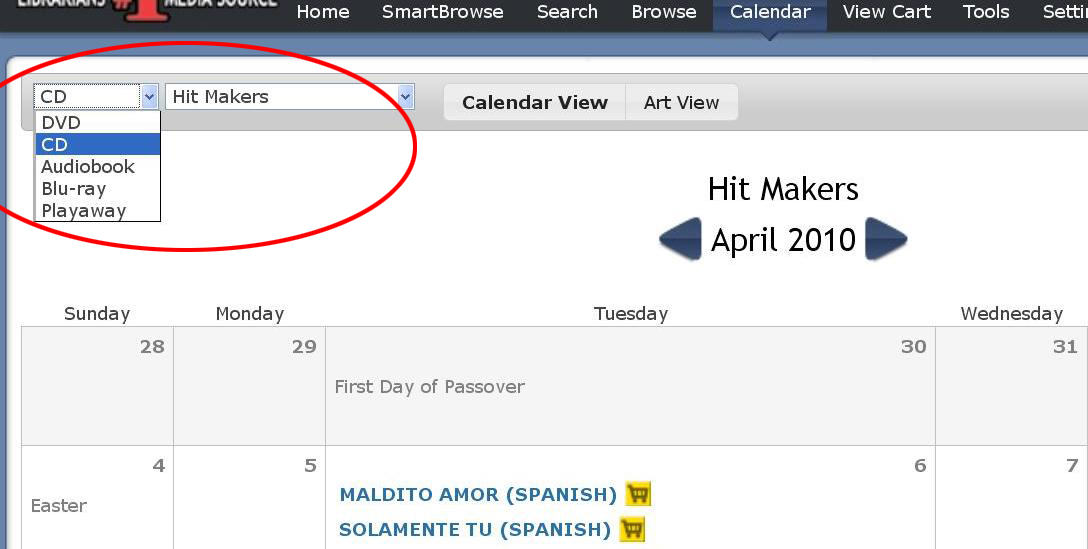
Click image to enlarge.

If you click the “Art View” option, the calendar will change from the list view display to an artwork display.

Click image to enlarge.

You will now be able to view the artwork for products in order of street date.

Click image to enlarge.

Blu-ray and Playaway Format Separation
Because our Playway and Blu-ray collections continue to grow, we have separated the two from the DVD and Audiobook formats.  You will now be able to view Playaway and Blu-ray titles via the new release and Quick Links panels on the homepage:

Click image to enlarge.

Additionally, when you search for titles via SmartBrowse, Blu-ray and Playaway results will show up separate from DVDs and Audiobooks:

Click image to enlarge.

Revised Help Tab
In order to make it more usable, we have redesigned the Help tab on the webpage. We’ve now reorganized items and made all links readily accessible:


Click image to enlarge.

For questions regarding our latest website updates, please contact Customer Service at 1.866.698.2231. You can also post your questions and feedback here as comments.

Tuesday, March 30, 2010

Learn about Processing: VIP

Variable Integrated Processing (VIP) uses digital imaging technology to generate product artwork incorporating all of your labels, perfectly placed every time. CVS Midwest Tape provides VIP for the exclusive use of our customers. This innovative program allows us to offer customised and attractive packaging while eliminating the need for additional labels.

Click image to enlarge

VIP allows libraries to specifically customise each title, depending on your library’s needs.

Click image to enlarge

No more stickers! Through VIP processing, we place labels perfectly, giving your products a consistent, attractive appearance. Additionally, because we incorporate your library’s information directly into the artwork, your products not only uphold a branded look, but also ensure theft deterrence.
Click image to enlarge

For help choosing what VIP process would best suit your library or for any questions regarding CVS Midwest Tape’s processing services, please contact your CVS Midwest Tape processing representative at 866.698.2231.

Processing is part of our Workflow Solutions services. To learn more about Workflow Solutions, start the setup process, or view samples, download our no-obligation Workflow Solutions brochure. You can also learn more by clicking the “Workflow Solutions” link under “SERVICES” on our homepage.

Which locking systems do you think are most effective? Share your thoughts and experiences here as comments.

Thursday, March 18, 2010

Learn About Processing: Locks and Cases

Did you know that the new Playaway case is compatible with the DVD one-time locking system? In fact, CVS Midwest Tape offers a variety of security options to help you protect your investments. For a minimal charge, CVS Midwest Tape can install locking systems in your DVDs, CDs, and Playaways, so your collections are secure and shelf-ready as soon as they ship.

Here are just a few types of locking mechanisms CVS Midwest Tape has to offer:

 DVD One-Time                   DVD DiscMate                Secure Case II

Red Tag                                         Benefit Denial Case

For help choosing between locking systems or for any questions regarding CVS Midwest Tape’s processing services, please contact your CVS Midwest Tape processing representative at 866.698.2231. 

Processing is part of our Workflow Solutions services. To learn more about Workflow Solutions, start the setup process, or view samples, download our no-obligation Workflow Solutions brochure. You can also learn more by clicking the “Workflow Solutions” link under “SERVICES” on our homepage.
Which locking systems do you think are most effective? Share your thoughts and experiences here as comments.

Wednesday, March 17, 2010

Learn About Processing: Hub Labels

For several years, CVS Midwest Tape has offered customised hub labels (sometimes referred to as ‘donuts’) for CDs, DVDs, and audiobooks. In years past, CVS Midwest Tape’s hub labels were made out of adhesive paper. More recently, however, CVS Midwest Tape has replaced paper labels with more durable vinyl labels. These vinyl labels are virtually impossible to rip and are made to better withstand casual wear and tear.

Gone are the days of handwriting information around disc hubs. With CVS Midwest Tape’s customised hub labels, libraries can have names, initials, branches, and barcodes printed on each disc. For a minimal fee, these printed labels will give your products an attractive, professional appearance, thus enhancing your library’s brand.


For help choosing hub label options or for any questions regarding CVS Midwest Tape processing services, please contact your CVS Midwest Tape processing representative at 866.698.2231.

Processing is part of our Workflow Solutions services. To learn more about Workflow Solutions, start the setup process, or view samples, download our no-obligation Workflow Solutions brochure. You can also learn more by clicking the “Workflow Solutions” link under “SERVICES” on our homepage.

Does your library use hub labels? How has it aided your workflows?
Share your experiences and feedback here as comments.

Tuesday, March 16, 2010

Learn About Processing: RFID Tagging

What are RFID Tags?
Radio-Frequency Identification tags are small electronic devices that consist of a chip and an antenna, which are applied to or incorporated into a product for the purpose of identification, tracking, and/or theft deterence.¹
Two Types of RFID Tags

RFID and Libraries
In the last decade, RFID tags have increased in popularity in a number of arenas, including retail stores, public transportation systems, and livestock inventory. Libraries have also made use of RFID tags. Initially used to provide security and theft deterrence, RFID tags can also be used to link a product to its barcode and issuing library. RFID tags have simplified library inventory management, too. Now, rather than scanning products in and out one at a time with traditional barcodes, librarians can scan an entire stack of products in one fell swoop.²

RFID and CVS Midwest Tape
CVS Midwest Tape can apply RFID tags for any system for a minimal charge. In addition, we can activate or link tags for the following four systems:
    For help choosing RFID options or for any questions regarding CVS Midwest Tape processing services, please contact your Midwest Tape processing representative at 866.698.2231.

    Processing is part of our Workflow Solutions services. To learn more about Workflow Solutions, start the setup process, or view samples, download our no-obligation Workflow Solutions brochure. You can also learn more by clicking the “Workflow Solutions” link under “SERVICES” on our homepage.

    Does your library use RFID tagging? How has it aided your workflows? Share your experiences and feedback here as comments.
    2QR6U2XUTHA3